Flowseeker - options flow

See where options money is going, live.
Flowseeker streams every options print with where it filled, its size and the open interest behind it, so you can tell a likely new position from noise.
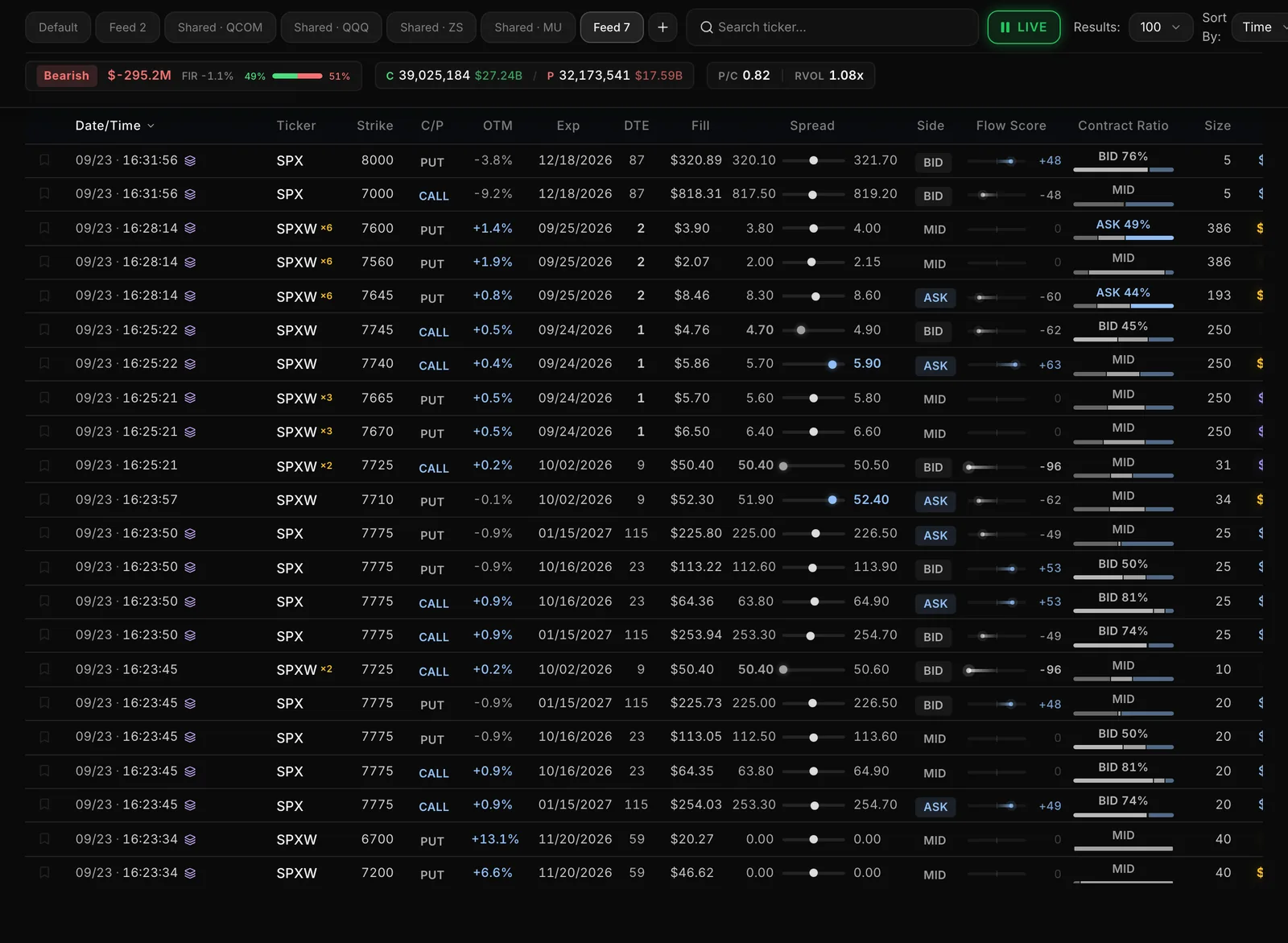
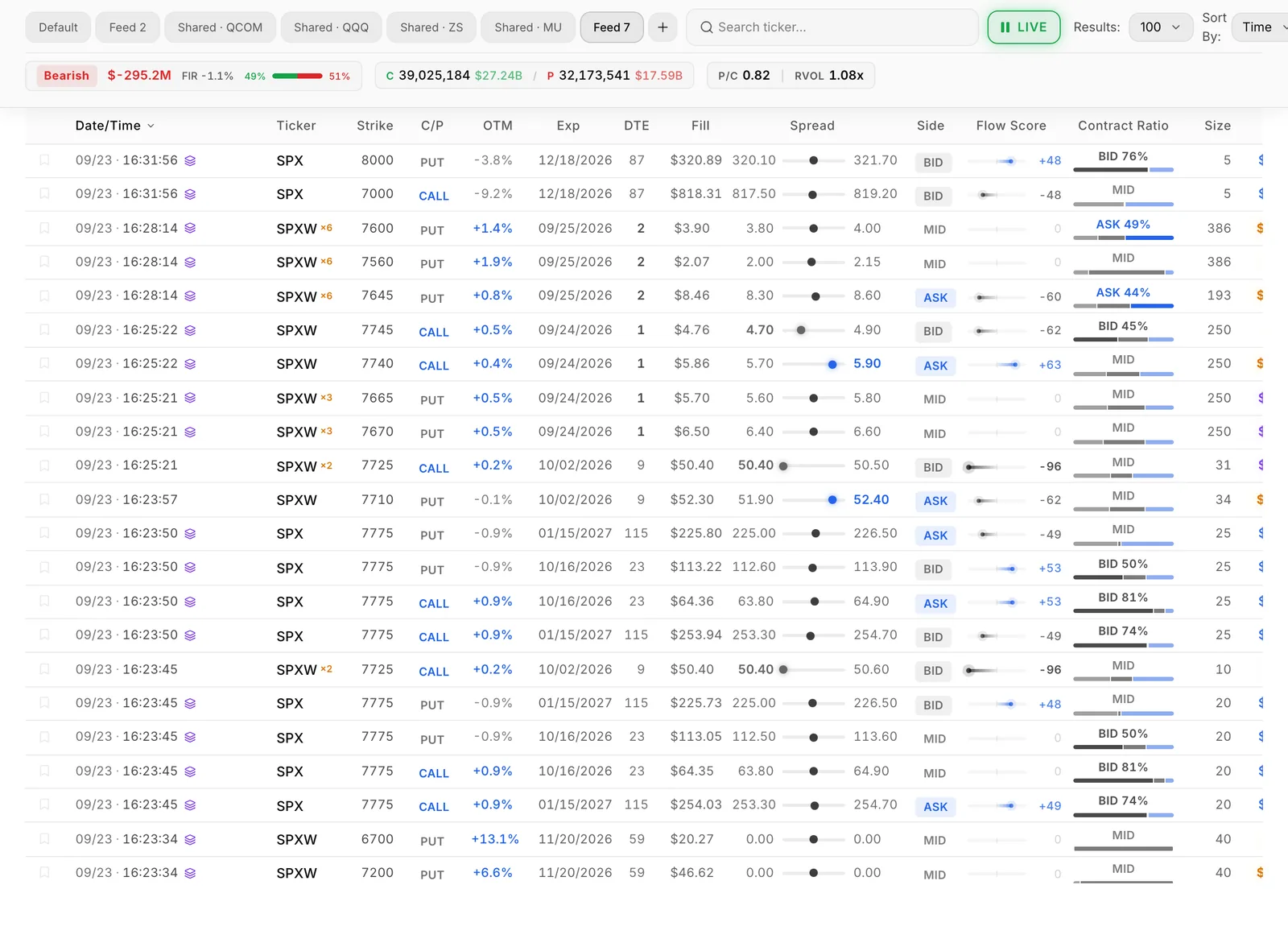
The problem
The tape moves faster than you can read it
- A huge call print flashes by and you can't tell if it's a new bet, someone closing, or one leg of a spread.
- Thousands of prints a day, and the ones that matter scroll past while you're looking at the chart.
- The flow is in one tab, the levels in another and the earnings date in a third.
With Flowseeker
Every print, with the context to read it
Flowseeker puts each trade next to what you need to judge it: bid or ask side, premium, size against open interest, and sweep, multi-leg and cross flags. Boards sum that flow by contract, by ticker and across the whole market, so you see where money is concentrating without reading every row. The next morning's open interest shows which positions were really opened.
How it works
Flowseeker, step by step
Watch the tape
Live Feed shows every print as it happens. Filter by ticker, calls or puts, side, days to expiry and premium, then save each setup as its own tab, like "0DTE SPY" or "Earnings week".
Find the busy contracts
Flow Scanner ranks the session's most active contracts, with presets such as Bullish Flow and Bearish Flow. Flow Compass shows the whole market's lean, from Market Tide down to one ticker's strikes.
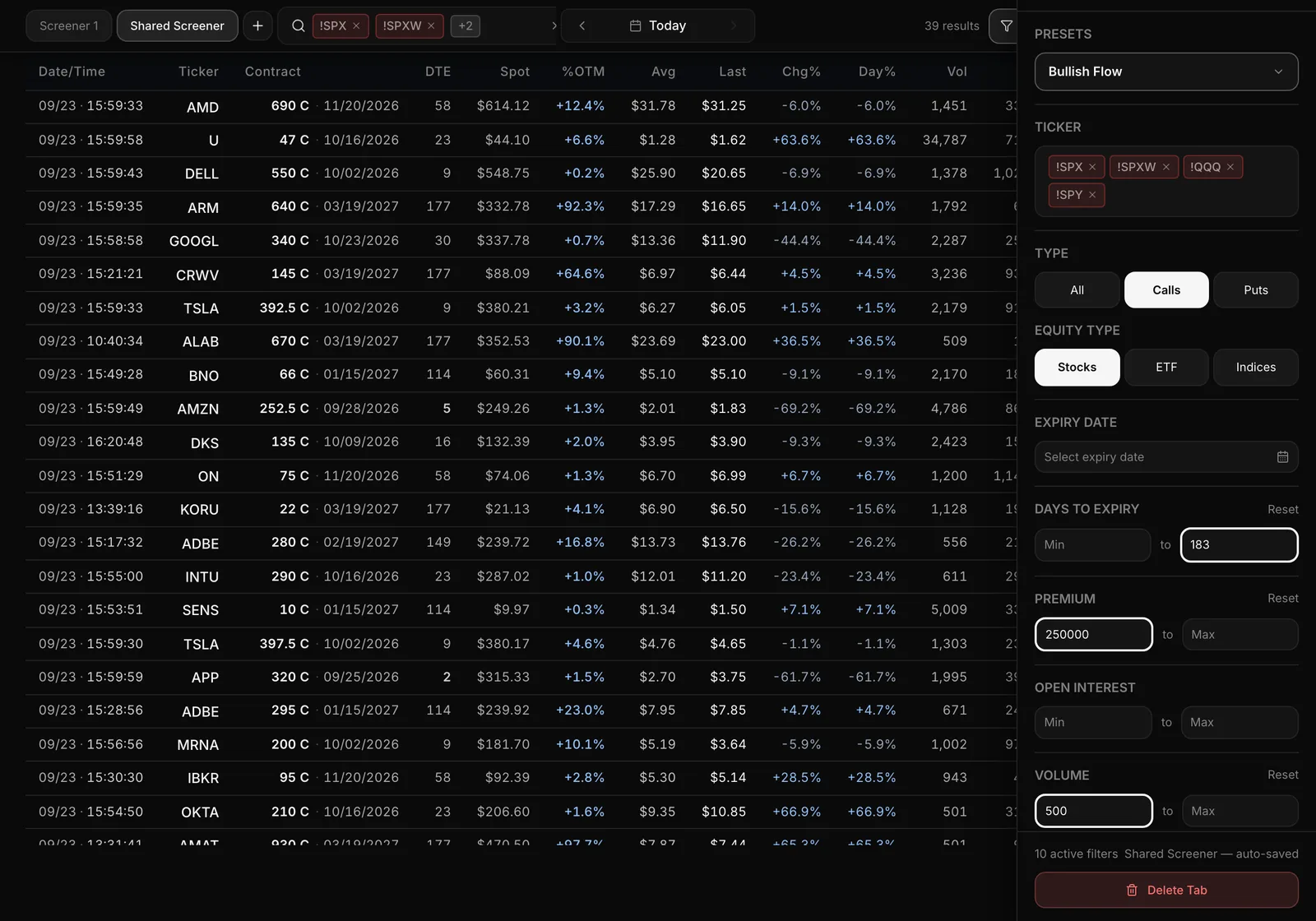
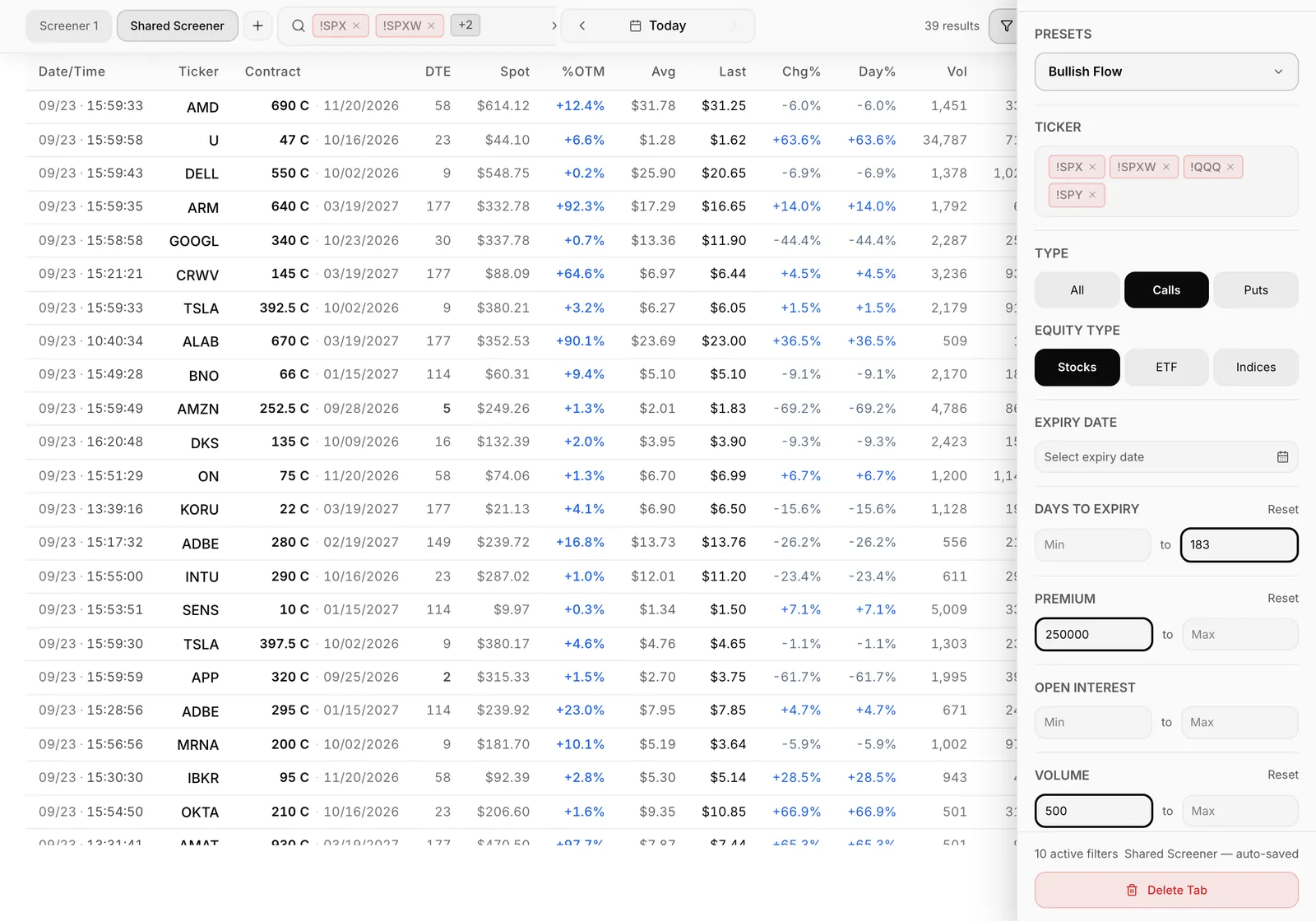
Drill into one contract
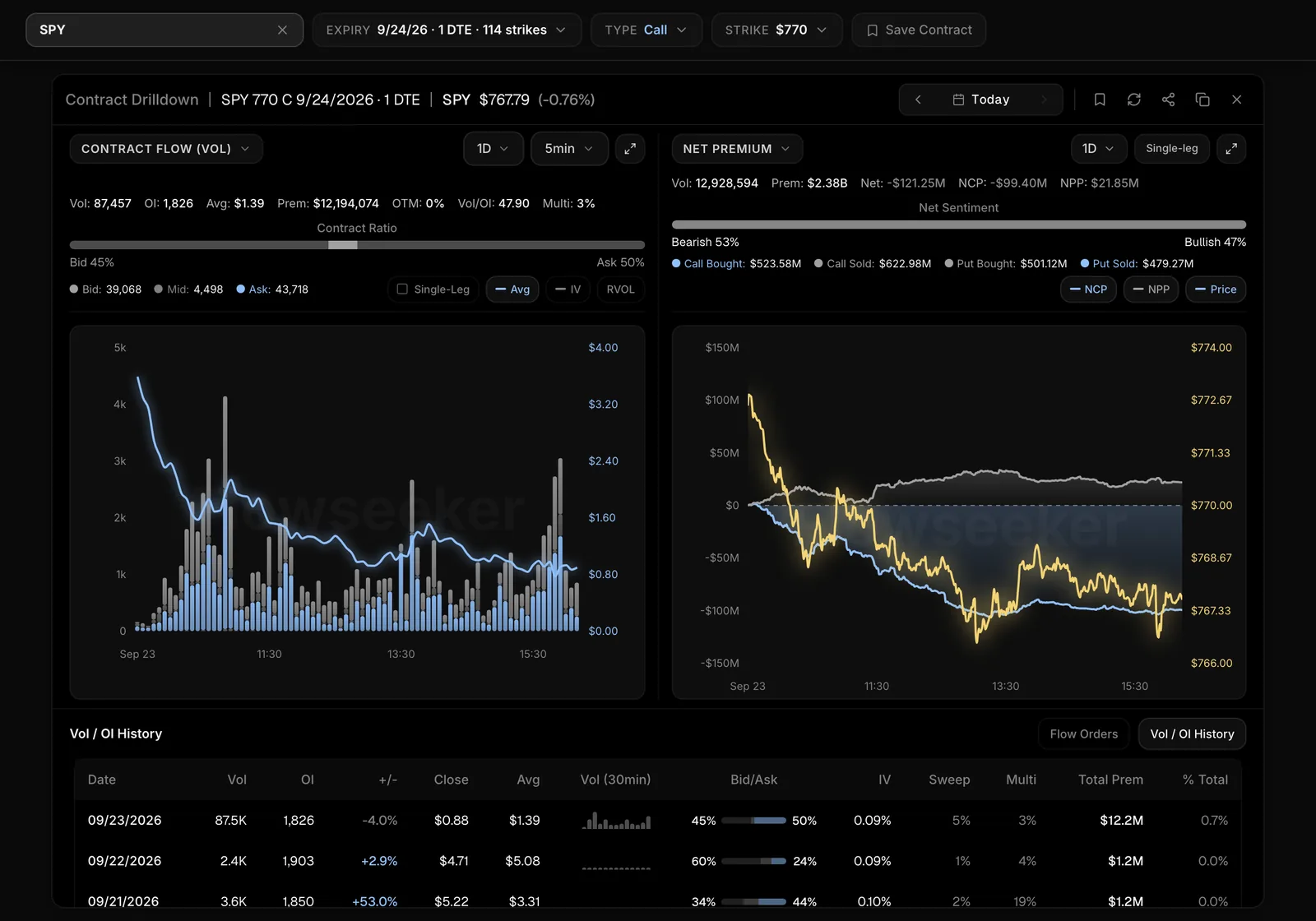
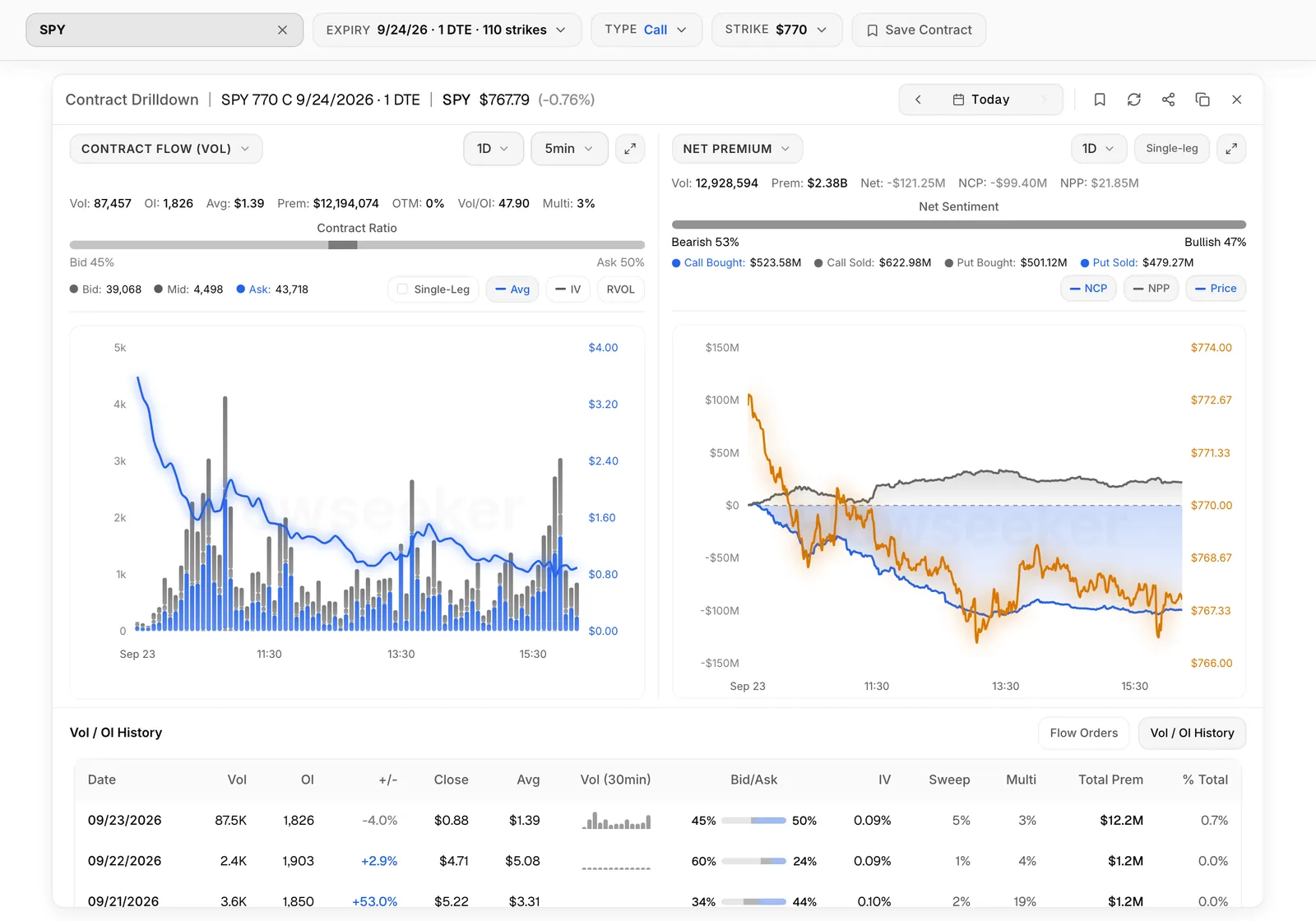
Click any row for the Contract Drilldown: flow bars through the day, the bid, mid and ask mix, calls and puts bought and sold, and the contract's Vol/OI history.
Follow what you found
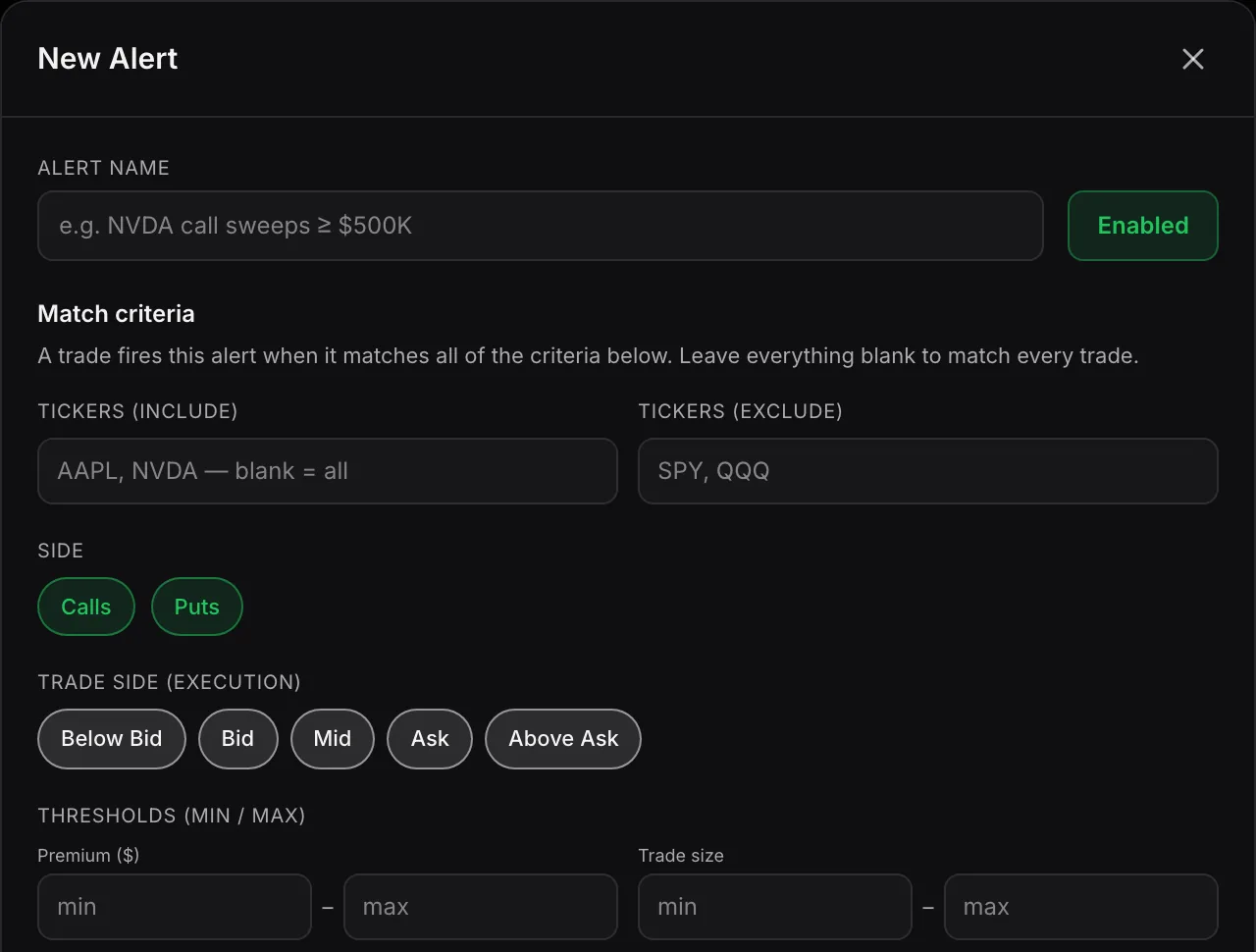
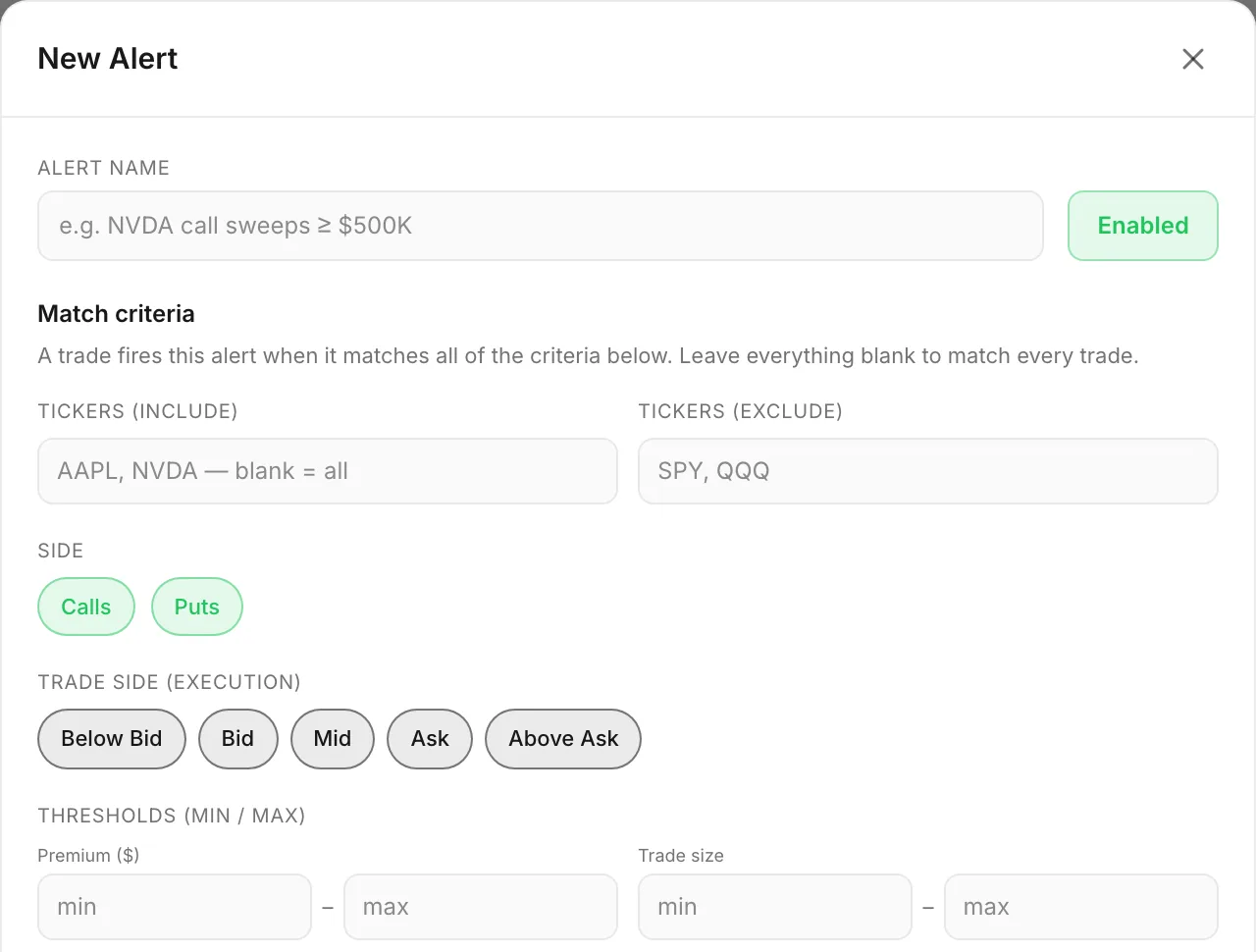
Save a print to the Flow Tracker to see whether the position appears to still be open, or set a Flow Alert so you hear about the next matching print without watching the tape.
01 / 04Watch the tape
Flow Compass
The whole market on one board
One board takes you from the whole market down to a single contract. Start at the market cards to see the day's lean, then move to a ticker or to the screens that surface contracts. Cards describe today; they don't predict.
Market Tide
The whole market's cumulative NCP and NPP through the session, with SPY on the right axis for context. Step back through past sessions with the arrows or the calendar.
Net Impact
Today's most bullish and most bearish names by net premium (NCP minus NPP). Indices and broad ETFs are excluded.
Breadth Heat Calendar
Per sector, what share of stocks closed above their own 20-day average. Broad or narrow participation. Daily; it does not move intraday.
Rotation Map
Each sector against an equal-weighted market: leading, weakening, lagging, improving. Press play to replay the rotation.
Capabilities
What you can do with Flowseeker
Filter the tape your way
Narrow Live Feed by ticker, side, expiry, premium, Vol/OI, Flow Score and more. Quick toggles isolate sweeps, single-leg or multi-leg trades, and prints bigger than open interest. Flow Highlighting colours those large prints so they stand out as the feed scrolls.
Separate new positions from noise
Size > OI, Vol/OI and next-day Delta OI show whether a print looks like a brand-new position. Multi-leg and cross flags warn you when a big call print is really one leg of something else.
Read the whole market on one board
Flow Compass takes you from Market Tide and Net Impact down to Strike Flow on SPY and QQQ, with screens for Aggressive Bets, Repetitive Hits and Large Opening Orders.
See large off-exchange stock trades
Dark Feed lists big dark-pool prints with size, notional and share of average volume, so you can note the prices where big blocks of shares changed hands.
Check the calendar before reading size
Company Events shows earnings, dividends and splits, plus insider filings and Congress disclosures for a ticker, so you know what might explain unusual flow.
Get alerted and share a digest
Keep up to 25 Flow Alerts delivered in-app, by push, email or Discord DM. Accounts with Flowseeker sharing can build an end-of-day Flow Summary and post it to their Discord channels.
Every feature
Everything in Flowseeker
50 features · 6 groups
Live Feed
See every options trade the moment it prints, one row per trade, under Flowseeker > Live Feed; set the Trade Date filter to replay a past day.
Guide: Live Feed (opens docs.skylit.ai in a new tab)Status pill
Know at a glance whether the tape is LIVE, PAUSED, CONNECTING or OFFLINE, so an empty feed never fools you; it sits at the top of Live Feed.
Guide: Status pill (opens docs.skylit.ai in a new tab)Filters
Cut the tape down to what you trade by ticker, calls or puts, side, days to expiry, premium, Flow Score, IV, days to earnings, sector and more from Filters on Live Feed; type !TICKER to leave a name out.
Guide: Filters (opens docs.skylit.ai in a new tab)Quick toggles
Isolate sweeps, crosses, single-leg or multi-leg trades, out-of-the-money strikes, or prints bigger than open interest with one click in the Live Feed filters.
Guide: Quick toggles (opens docs.skylit.ai in a new tab)Columns
Show, hide and reorder the columns you actually read, from Fill and Side to Strategy and Earnings, under Columns on Live Feed.
Guide: Columns (opens docs.skylit.ai in a new tab)Flow Highlighting
Colour rows whose volume or size is above open interest so likely new positions stand out as the feed scrolls; turn it on at the foot of the Columns panel.
Guide: Flow Highlighting (opens docs.skylit.ai in a new tab)Feed tabs
Keep several setups side by side, like "0DTE SPY" and "Earnings week", each with its own filters, columns, sort and highlighting; use Add new feed tab, Rename and Duplicate on Live Feed.
Guide: Feed tabs (opens docs.skylit.ai in a new tab)Show matching and Filter out
Right-click a cell such as Ticker or Side to show only that value or hide it, without opening Filters.
Guide: Show matching and Filter out (opens docs.skylit.ai in a new tab)Strategy view and cross badge
Open a multi-leg row to see its strike structure, or click a cross badge to see the stock hedge paired with it, so you don't read one leg as the whole trade.
Guide: Strategy view and cross badge (opens docs.skylit.ai in a new tab)Share and CSV
Copy or save an image of the feed, or download the rows as CSV, from Share at the top right of Live Feed.
Guide: Share and CSV (opens docs.skylit.ai in a new tab)Dark Feed
See large off-exchange stock trades with price, size, notional and share of average volume, so you can note the prices where big blocks of shares changed hands; it has its own filters and tabs under Flowseeker > Dark Feed.
Guide: Dark Feed (opens docs.skylit.ai in a new tab)
Side
See whether a trade filled below the bid, at the bid, mid, ask or above the ask, which tells you how urgent it was (not why); it is a column on every feed.
Guide: Side (opens docs.skylit.ai in a new tab)Premium
See how many dollars changed hands on each print, so you can judge size for that name; it is the Prem column.
Guide: Premium (opens docs.skylit.ai in a new tab)Vol/OI and Size > OI
Compare today's volume, or a single print, with the contracts already open, the strongest hint that a position is being opened; both are columns and filters on Live Feed.
Guide: Vol/OI and Size > OI (opens docs.skylit.ai in a new tab)Delta OI
Check the next morning whether open interest actually grew, which confirms or retracts yesterday's read; it is the ΔOI column.
Guide: Delta OI (opens docs.skylit.ai in a new tab)Flow Score
Rank prints from -100 (bearish) to +100 (bullish) by how directional they look, so the most one-sided trades rise to the top; it is a column and a filter range on Live Feed.
Guide: Flow Score (opens docs.skylit.ai in a new tab)Sweep, multi-leg and cross flags
Spot orders rushed across several exchanges, prints that are one leg of a spread, and trades matched before they printed, before you read direction from a row.
Guide: Sweep, multi-leg and cross flags (opens docs.skylit.ai in a new tab)NCP and NPP
See net call premium and net put premium, each netting ask-side against bid-side aggression, on Market Tide, Net Impact and the Atlas Net Premium pane.
Guide: NCP and NPP (opens docs.skylit.ai in a new tab)Read one print in six steps
Follow a short checklist (legs, fill, size against open interest, premium, expiry and strike, then the chart) whenever a big print catches your eye; it is in this guide.
Guide: Read one print in six steps (opens docs.skylit.ai in a new tab)
Flow Scanner
See which contracts are unusually busy today, one row per contract summed over the session, with the top 100 by premium refreshing every few seconds under Flowseeker > Flow Scanner.
Guide: Flow Scanner (opens docs.skylit.ai in a new tab)Flow Scanner presets
Start from Bullish Flow, Bearish Flow, Call Sells or Put Sells, then adjust the filters; the name shows "(modified)" once you do.
Guide: Flow Scanner presets (opens docs.skylit.ai in a new tab)Bull/Bear and Chain Bull/Bear
See the bullish and bearish split for each contract and for its whole chain, next to ΔOI, %Tot and Contract Ratio, in the Flow Scanner columns.
Guide: Bull/Bear and Chain Bull/Bear (opens docs.skylit.ai in a new tab)Flow Compass
Go from the whole market down to one contract on a single board of cards you can drag into your own order, with an info button on each card, under Flowseeker > Flow Compass.
Guide: Flow Compass (opens docs.skylit.ai in a new tab)Market Tide
Watch the whole market's net call and net put premium build through the session with SPY alongside, and step back through past sessions with the arrows or calendar on Flow Compass.
Guide: Market Tide (opens docs.skylit.ai in a new tab)Net Impact
See today's most bullish and most bearish names by net premium, with indices and broad ETFs left out, on Flow Compass.
Guide: Net Impact (opens docs.skylit.ai in a new tab)Strike Flow
Read one ticker strike by strike, with call and put premium split into bought and sold, on SPY and QQQ cards with windows from 1M to DAY and REPLAY for earlier sessions, on Flow Compass.
Guide: Strike Flow (opens docs.skylit.ai in a new tab)Aggressive Bets
Find heavily bought, out-of-the-money, single-leg contracts whose volume is unusual for that contract, ranked by how unusual, on Flow Compass.
Guide: Aggressive Bets (opens docs.skylit.ai in a new tab)Repetitive Hits
Spot contracts hit this week by several similar-size ask-side bursts, a pattern that can mean someone is building a position in pieces, on Flow Compass.
Guide: Repetitive Hits (opens docs.skylit.ai in a new tab)Large Opening Orders
See today's largest bought-to-open single-leg orders that were bigger than the contract's open interest, on Flow Compass.
Guide: Large Opening Orders (opens docs.skylit.ai in a new tab)Top Industries
See today's premium grouped by industry and ranked by net directional flow, then click an industry for its leading tickers, on Flow Compass.
Guide: Top Industries (opens docs.skylit.ai in a new tab)Breadth Heat Calendar and Rotation Map
See how broad participation is in each sector, and replay which sectors are leading, weakening, lagging or improving, on Flow Compass.
Guide: Breadth Heat Calendar and Rotation Map (opens docs.skylit.ai in a new tab)
Contract Lookup
Type a ticker like TSLA for its spot move, call, put and net premium, P/C ratio and bullish/bearish mix, or type a full contract to jump straight to it, under Flowseeker > Contract Lookup.
Guide: Contract Lookup (opens docs.skylit.ai in a new tab)Contract boards
Rank a ticker's contracts by Top Volume, Top Premium, Top Open Interest, Unusual · Vol / OI and Top Sweeps (with Swept %) over 1D, 7D or 1M, and tick Single-leg only to keep big spreads off the boards.
Guide: Contract boards (opens docs.skylit.ai in a new tab)Contract Drilldown
Click any row anywhere to see a contract's flow bars through the day, bid/mid/ask mix, calls and puts bought and sold, Flow Orders and Vol/OI history, so you can tell one loud print from repeated interest.
Guide: Contract Drilldown (opens docs.skylit.ai in a new tab)Earnings grid and expected moves
See who reports each day this week, before or after the bell, and each day's expected moves, under Flowseeker > Company Events.
Guide: Earnings grid and expected moves (opens docs.skylit.ai in a new tab)Ticker events
Check a ticker's earnings, dividends and splits, newest first, so you know what might explain unusual flow before you read size as a bet, on Company Events.
Guide: Ticker events (opens docs.skylit.ai in a new tab)Insider activity
Read a ticker's Form 4 insider filings and search them by name, role, action or security, on Company Events.
Guide: Insider activity (opens docs.skylit.ai in a new tab)Congress disclosures
See trades disclosed by members of Congress in a ticker as slow background next to its flow, on Company Events.
Guide: Congress disclosures (opens docs.skylit.ai in a new tab)
Tracked Flow
Save a print with Track trade (right-click a Live Feed row) and see whether the position appears Still in, Pending, Partial, Exited or Expired, under Flowseeker > Flow Tracker.
Guide: Tracked Flow (opens docs.skylit.ai in a new tab)Tracked Contracts
Bookmark a contract from the Contract Drilldown or a Compass card to keep its current mid and spot in one list on Flow Tracker.
Guide: Tracked Contracts (opens docs.skylit.ai in a new tab)Flow Alerts
Hear about the next print that matches your filters without watching the tape: press New Alert under Flowseeker > Flow Alerts, set a rate limit, and keep up to 25 alerts.
Guide: Flow Alerts (opens docs.skylit.ai in a new tab)Alert delivery and History
Get alerts in-app, by push, email or Discord DM (set once in Notifications), and see everything that fired on the History tab.
Guide: Alert delivery and History (opens docs.skylit.ai in a new tab)Flow Summary
Build an end-of-day digest by right-clicking Live Feed or Flow Scanner rows and choosing Add to summary, then post it to your Discord channels (accounts with Flowseeker sharing).
Guide: Flow Summary (opens docs.skylit.ai in a new tab)Flowseeker Settings
Choose your Discord channels and the digest's sections, and manage API keys if your account has API access, under Flowseeker > Settings.
Guide: Flowseeker Settings (opens docs.skylit.ai in a new tab)
Flowseeker on your phone
Use the same pages on a phone from the Flowseeker bar: Live Feed, Dark Feed, Flow, Compass, Lookup, Events, Tracker and Alerts.
Guide: Flowseeker on your phone (opens docs.skylit.ai in a new tab)Flow on Atlas
Add Flow from the Atlas Add menu for call and put premium bars under your candles, with their own filters and an optional sweep call/put ratio line (plans that include charts).
Guide: Flow on Atlas (opens docs.skylit.ai in a new tab)Net Premium, Flow VWAP and Dark Pool on Atlas
Add session net call and put premium, Flow VWAP, and lines at the largest dark-pool prices from the same Atlas Add menu.
Guide: Net Premium, Flow VWAP and Dark Pool on Atlas (opens docs.skylit.ai in a new tab)Flow with Heatseeker levels
Check what the flow at a strike shows next to where dealers are positioned, to see whether money is backing a Heatseeker level.
Guide: Flow with Heatseeker levels (opens docs.skylit.ai in a new tab)Talon on Flowseeker pages
Ask "what am I looking at?" or "Summarise this tab" and Talon answers from your active filters and the rows in view (Pro and higher plans).
Guide: Talon on Flowseeker pages (opens docs.skylit.ai in a new tab)Talon flow commands
Ask in plain English or use /flow, /darkpool, /metrics, /market and /earnings for a name's flow, dark-pool prints, put/call and max pain, the market, and earnings, insiders and Congress.
Guide: Talon flow commands (opens docs.skylit.ai in a new tab)
Why traders pay for it
What Flowseeker puts in your hands
What's uniquely in hand
Every options print as it happens, with the side it filled on, its size against open interest and sweep, multi-leg and cross flags, so a likely new position stands apart from noise.
Time it gives back
Saved feed tabs, Flow Compass and up to 25 Flow Alerts do the watching, so you never have to read every row.
What it replaces
A raw time-and-sales feed, a separate dark-pool tracker and an earnings calendar in another tab.
Included with every plan.Market data licensed via NASDAQ, CBOE and OPRA.
Pairs with
Flowseeker with the rest of Skylit
Heatseeker
Flow shows what is trading; Heatseeker shows where dealers are positioned. Many traders check what Strike Flow shows at a Heatseeker level.
Atlas
Add Flow, Net Premium, Flow VWAP and Dark Pool lines from the Atlas Add menu to see flow under your candles (plans that include charts).
Talon
Ask about flow in plain English, like "What's unusual today?" or /flow NVDA. On Flowseeker pages Talon sees your filters and the rows in view (Pro and higher plans).



Strike Flow bars show bought and sold only(in the guide, opens docs.skylit.ai in a new tab)
Strike Flow bars now show only bought and sold premium, with mid prints on hover, so each bar counts only trades with a clear side.
1M window on Contract Lookup(in the guide, opens docs.skylit.ai in a new tab)
Contract Lookup boards now switch to 1M, so you can see which contracts led volume, premium and open interest over the past month.
Congress disclosures on Company Events(in the guide, opens docs.skylit.ai in a new tab)
Company Events now shows a ticker's trades disclosed by members of Congress, so you can spot that background before reading its flow.
Which plans include Flowseeker?
Flowseeker is included in the Community, Initiate and Pro plans. The first time you open it, you sign the OPRA market-data agreement (OPRA publishes US options trades). You only sign once.
What's the difference between Live Feed and Flow Scanner?
Each Live Feed row is one trade, so you see orders the moment they print. Each Flow Scanner row is one contract summed over the session, so you see which contracts are unusually busy today.
Can I save my filters?
Yes. Each Live Feed tab keeps its own filters, columns, sort and highlighting. Add, rename and duplicate tabs to keep several setups side by side.
Does an ask-side call print mean someone is bullish?
Not on its own. Side tells you where a trade filled, not why. A hedge, a close or one leg of a spread can all print at the ask. Check the multi-leg and cross flags, size against open interest, and the next morning's Delta OI before you read direction.
Does Flowseeker show market tide?
Yes. Market Tide on Flow Compass tracks the whole market's net call and net put premium through the session, with SPY for context, and you can step back through past sessions.
Does Flowseeker tell me what to trade?
No. Flowseeker shows what traded and where it filled. It is not a forecast and not a recommendation. Flow Score ranks prints by how directional they look; it has not been tested as a predictor of moves.

Read the tape with context
Live options flow, dark-pool prints and market-wide boards in one place. Educational tool, not financial advice.